
“It doesn’t work.”
The report arrives with no version, no environment, no steps. Reproducing it in the lab is guesswork, and the lab is nothing like their machine.
Reproduce. Understand. Resolve.
SeeTheBug walks your customer through reproducing the issue on their own machine — recording the screen, collecting the logs, and capturing the environment as they go. What lands on your desk is a single sealed package your engineers can actually act on — encrypted end to end when you configure a key.
Watch the overview
The support loop
On-premise and desktop software is the hardest kind to support. You cannot see the machine, you cannot reach the logs, and the person who can is the one least equipped to describe what went wrong.
“It doesn’t work.”
The report arrives with no version, no environment, no steps. Reproducing it in the lab is guesswork, and the lab is nothing like their machine.
“I clicked the button.”
You think they meant A. They meant B. Three emails later you discover it was a different screen entirely — and the customer is already frustrated.
“It worked yesterday.”
They are using your product in a way you never anticipated, on a configuration you have never seen. Nothing in the description tells you that.
The solution is not a better bug-report form. It is being in the room when it happens.
How it works
Configure a deployment profile in the portal and download a preconfigured, code-signed installer. Everything it needs is baked in — your customer never signs in or picks an account.
The client launches from the tray and walks them through it step by step, recording the screen and gathering diagnostics in the background while they work.
Everything is sealed into a single file — encrypted end to end once you configure a key — and uploaded to your account, or written to disk when the machine has no connectivity, so it can reach you by whatever route that environment allows.
See it in action
Before the package is sent, the person who recorded it can play it back and mask anything that should not travel — a password field, a customer name, whatever happens to be on screen.
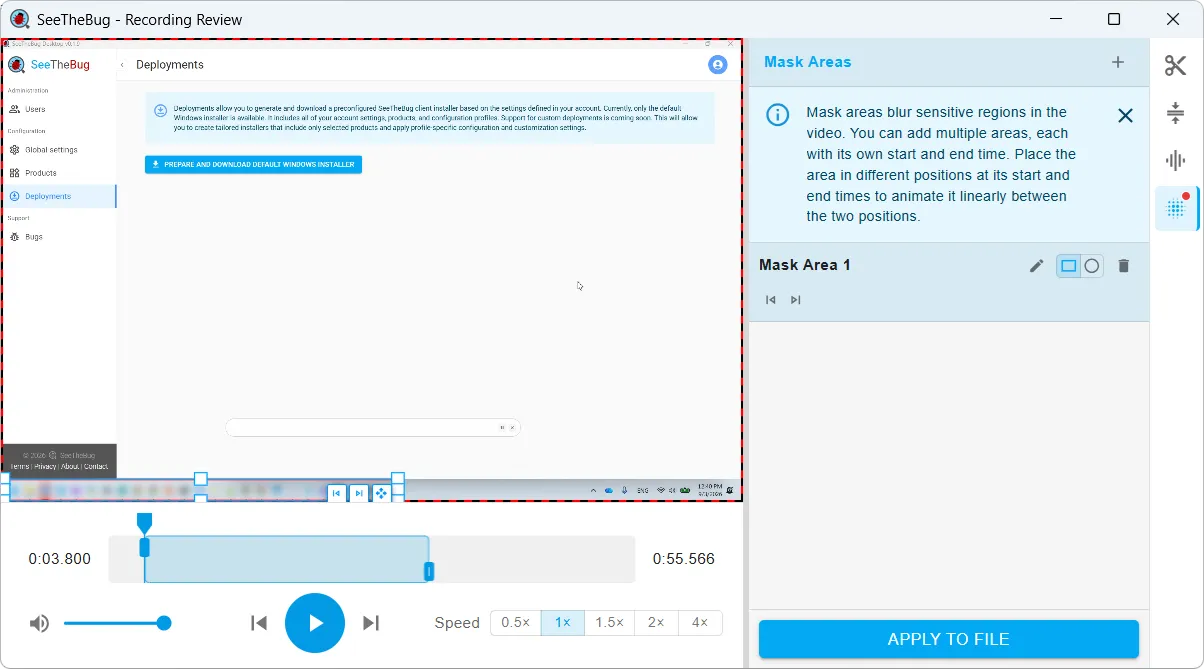
Guided reproduction
The hard part of remote support is not capturing data — it is getting the right data, from a person who is not a tester, on a machine you cannot touch.
The end user opens it from the tray and starts. They never register, never pick an account, and never see your portal.
The preparation is yours: the steps you configure run automatically, the same way on every machine. Reproducing the bug is the one part only the person hitting it can do — so that is theirs, everything around it is fixed, and every report comes back in the same format.
Configuration is baked into the installer, so an air-gapped or offline machine captures exactly the same package. It is written to disk instead of uploaded, ready to travel by whatever route that environment permits.
Intermittent bugs do not appear on cue. Sessions can run for hours, with periodic check-ins so the user is never left wondering if it is still recording.
What it captures
You choose what each reproduction collects. The user just reproduces the problem — the client gathers the rest without them having to find a log directory or read out a version number.
Every monitor, captured together — so a bug that only shows up when the window spans two displays still gets caught.
Let the user talk through what they expected while it happens. Often the single most useful artifact in the package.
Raise your product’s log level before the reproduction, collect the output, and put it back afterwards. No standing debug logging in production.
OS build, hardware, displays, running processes, user and group membership — the environment details nobody ever thinks to include.
Adapters, DNS, proxy configuration, VPN tunnels and active connections. Where “works on our network” problems finally explain themselves.
Windows performance data collected across the session, so slowdowns and leaks show up as a curve rather than an anecdote.
If your product crashes during the reproduction, the client captures a memory dump at that moment. For a product that hangs, it can also take one, or a series, when the reproduction ends — the state your debugger needs.
The user adds context in their own words and attaches anything else that matters before the package is sealed.
Anything the list above misses, you script yourself — plus pre- and post-reproduction commands to set the machine up and put it back.
Transparent to your product
SeeTheBug runs beside your product, not inside it. Other session-replay and observability tools need you to instrument your code and ship a build before they see anything. SeeTheBug works on the version your customer already has installed. And because the installer is yours, the client wears your name, icon and color, in any of nine languages.
End-to-end encryption
A bug report from an enterprise customer is not a screenshot. It can contain their data, their network topology, and their users. Handing that to a third-party SaaS is a conversation nobody wants to have — so we designed the platform not to be able to read it. Configure an encryption key in your account and every capture is sealed to you before it leaves the machine.
Once you have configured an encryption key, a fresh AES-256-GCM key is generated for every capture package and the payload is encrypted on the end user’s machine, before anything is uploaded.
That key is wrapped with your public key. Your private key never touches the platform, so only your support engineers can unwrap it.
We store ciphertext and routing metadata. The authentication tag means a package that has been altered in transit will not open at all.
Packages are sealed in a single .stbug container. Without your private key the payload cannot be opened — only the routing header and the SeeTheBug client’s own diagnostic logs travel outside it. Encryption is opt-in: until you configure a key, captures are uploaded unencrypted. Full detail in our Privacy Policy.
Any product, any environment
Your customers are not all on the same stack, and the awkward deployments are exactly the ones that generate the hardest support cases.
Built for the deployments nobody else covers — customer datacenters, isolated networks, and machines you will never get remote access to.
The same client and the same package format, whether the product under test is installed locally or running in a browser against your cloud.
Deployment profiles inherit from your account down to each product and organization, so a profile can be as generic or as specific as you need.
Capture packages carry the context your ticketing system needs, so a case becomes an actionable ticket rather than another thread to chase.
Adoption
You do not have to change how your support organization works to get value on day one. Most teams grow into this over months, and each stage is useful on its own.
One stubborn case. Generate a preconfigured SeeTheBug client installer, send it to the customer, get the package back. Nothing to plan and nothing to integrate.
It worked, so it becomes the process. Build deployment profiles per product so every engineer requests reproductions the same way.
The client goes out alongside your installer. It is already on the machine when the customer calls, so capture starts immediately.
Profiles are versioned with your releases and generated by your build, so the collectors always match the code your customer is running.
On the roadmap
Today SeeTheBug gets your engineers a complete, reproducible case. Next, we want it to help them read it: ask the platform to analyze an uploaded capture package and return a report on what went wrong. Where you choose to give it access to your source, that report can go further and suggest a fix.
These capabilities are in development and are not part of the product today.
Where we are today
The product is real and in use, but it is young — so here is exactly where things stand.
Every feature is available to every account, with no usage limits and nothing to pay. There is no billing in the product today.
Eventually features will be grouped into free and paid plans. Early users will hear directly from us before anything changes.
Capabilities will be added, refined, and occasionally removed as we learn what actually helps support teams. Tell us what is missing and it carries real weight right now.
Start free and get your first reproduction today — or walk through it with us and see a real one end to end.
Free while in early access. No credit card required. End users never need an account.